By LisaUpdated on March 11, 2026
Summary:
Hulu officially doesn't allow you to download videos on Hulu on your Mac, but you can still do this with the help of a third-party tool - iMovieTool Hulu Video Downloader. Learn how to download Hulu videos on Mac as HD MP4 with either Hulu ad-free or ad-supported account.
Hulu is popular for its massive content library, award-winning originals, and access to current TV episodes. If you have an ad-free subscription on Hulu, you can easily stream and download high-qualilty TV shows and movies. However, many Mac users face a common challenge: how to download Hulu videos on Mac for offline viewing. Because there is no a dedicated Hulu app for Mac. The offline download feature is only limited to mobile devices.
Streaming Hulu content online works well when you have a stable internet connection, but there are many situations you need to watch Hulu offline on Mac. So, how do you download shows on Hulu on Mac? Well, there are still an easy way you can get Hulu downloads on your Mac effortlessly and efficiently! This post will introduce a powerful Hulu video downloader to save Hulu videos permanently on your iMac, MacBook, or other devices! Keep reading.
Can You Download Movies from Hulu on Mac?
Currently, Mac users can only access Hulu through a web browser. Hulu only allows ad-free subscribers to download selected movies and TV shows through the Hulu mobile app on supported devices. This official downlaod feature is limited to platforms like iOS and Android, which means Mac users cannot directly download Hulu videos to Mac through the official platform.
While Hulu hasn't released an official Hulu app for macOS, a good news is that you can utilize a third-party Hulu video downloader. Here we highly recommend the iMovieTool Hulu Video Downloader. It is a desktop application, available on both mac OS and Windows OS. Scroll down to learn more.
Tool Required: iMovieTool Hulu Video Downloader
When it comes to download Hulu videos on Mac, using a professional downloader is the most efficient solution. One of the best Hulu video downloaders refer to the iMovieTool Hulu Video Downloader.
iMovieTool Hulu Video Downloader is a desktop software that provides Hulu unlimited download services on both Mac and Windows. Whether you are using an Hulu ad-supported or ad-free account, you can use it to download Hulu videos on MacBook or iMac quickly and easily. Unlike the Hulu mobile app with limited downloads, the software allows you to download unlimited Hulu movies, TV shows, and original content, and save them as local MP4 or MKV files to your computer for permanently offline viewing.
iMovieTool comes with a built-in Hulu web player. This feature allows users to access Hulu directly within the program without needing relying on the Hulu platform. Once you log into your Hulu account, you can browse the entire Hulu library and select the content you want to download. It works at up to 50 times faster than the Hulu app, so you don't need to wait much time. What's more, it also preserves HD 1080p resolution, multilingual audio tracks and subtitles. After downloading, you can watch your favorite Hulu shows or movies on Mac using other media player anytime, no expiration!
Key Features of iMovieTool Hulu Video Downloader:
- Download Hulu movies and TV shows directly on macOS.
- Download and save Hulu videos in MP4 or MKV format.
- Preserve HD 1080p video quality for smooth playback.
- Built-in Hulu web player for easy browsing and searching.
- Support multiple audio tracks and subtitle languages.
- Batch download Hulu videos to Mac/PC at 50X faster speed.
Step-by-Step: How to Download Hulu Videos on Mac
Follow this guide closely to download Hulu shows and movies on MacBook or iMac efficiently. You can download and install the software on your computer in advance.
Step 1. Launch iMovieTool Hulu Video Downloader
After launching iMovieTool, select Hulu service from the main interface to enter the iMovieTool Hulu Video Downloader.

Step 2. Log in to a Hulu Account
Next, select a country among Hulu US, Hulu JP, and Hulu JP Store.

Then, enter your Hulu ad-free or ad-supported account credentials and sign in to access the full Hulu library including all movies and TV shows.

Step 3. Search for Hulu Videos
iMovieTool offers three intuitive methods to find the Hulu video content you wish to download.
1# Using Name: Click the "Search" tab and type the title of the movie or show directly into the built-in search bar to quickly locate your desired content.

2# Using URL: Navigate to Hulu website in the external browser, copy the link of the video you want, and paste it into iMovieTool's search bar for instant recognition.
3# Browse Online: Use the software's built-in browser to browse Hulu organically, exploring categories and libraries just as you would on the official site. Open the video page and click "+" icon to add it, then hit on "Download" icon to get it directly.
Step 4. Change Output Settings
Before downloading Hulu video content, click the Menu bar > Preference. Here, you can set the output format to MP4 for maximum Mac compatibility, select high video quality (up to 720p/1080p), and choose your preferred subtitle and audio track languages.

Step 5. Download Hulu Videos to Mac in MP4
Once you have located the Hulu movie click the "Download" icon next to the title. The software will start processing the video and download Hulu videos on MacBook or iMac to your selected folder.
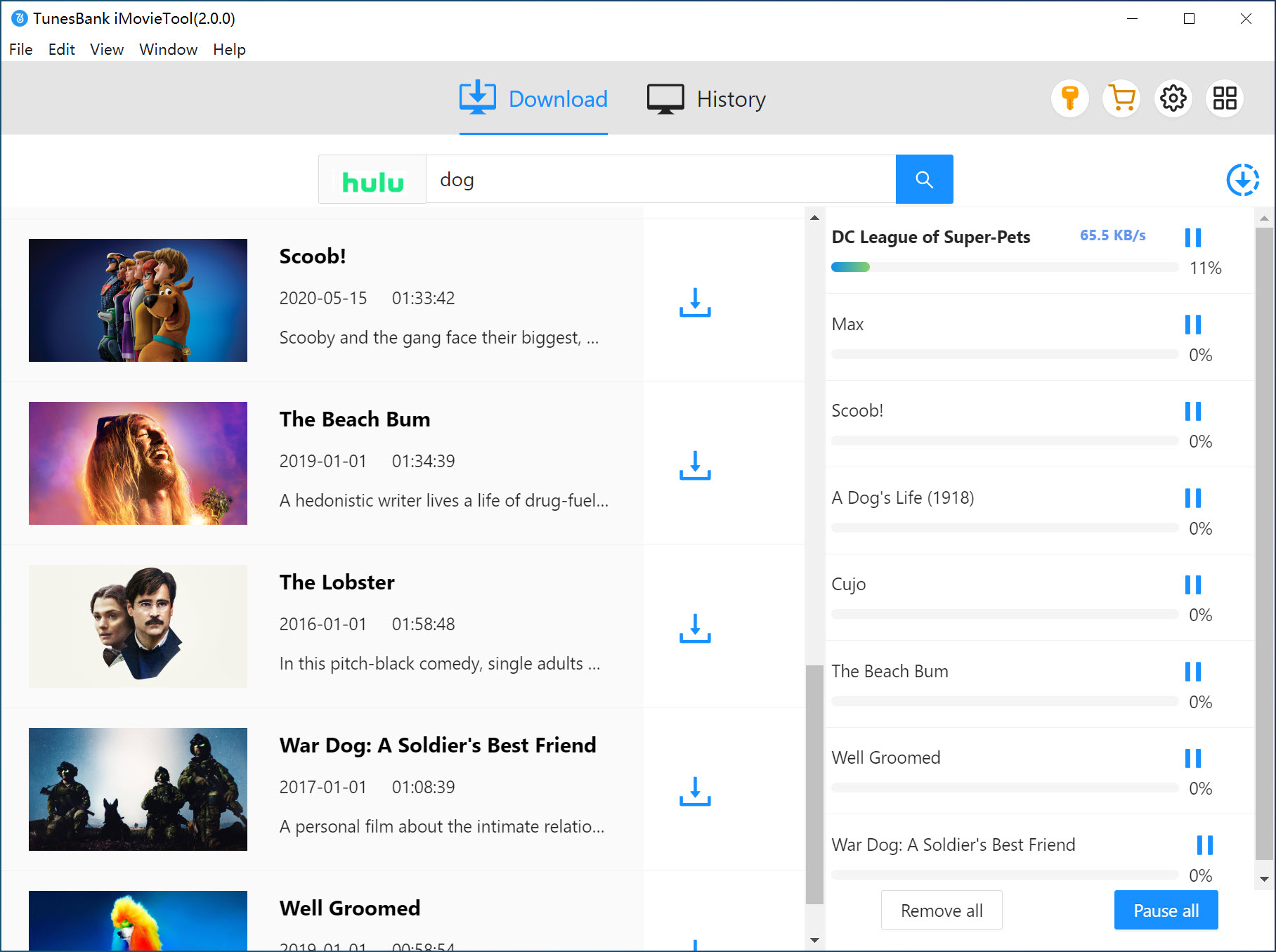
For TV shows, when you click on the "Download" icon, a window will pop up allowing you to select specific episodes or seasons (for TV series). Confirm your choices and click "Download" button. You can also download multiple episodes simultaneously.
Step 6. Get Downloaded Hulu Video Files on Mac
After the download completes, navigate to the "History" tab within the software. All downloaded files will be stored locally on your computer, allowing you to save Hulu videos on Mac and watch them anytime without an internet connection.

Final Words
It's such a pity that you can't directly download Hulu videos on Mac through its official platform. Luckily, there are many available Hulu video downloaders on the market that can help you save Hulu videos on Mac. iMovieTool Hulu Video Downloader, as introduced above, is a great alternative developed for all Hulu users to bypass the official download limits and download Hulu videos on iMac, MacBook, Windows PC or laptop. This ways, users can watch Hulu videos offline on Mac anytime without internet restrictions. Hit the download button to get it, download Hulu shows on Mac, keep them on your computer, and enjoy uninterrupted entertainment wherever you go.
iMovieTool Hulu Video Downloader
Download Hulu Shows & Movies to Mac Easily!

Comments
Sorry the comment has been closed.
Comments are off!