By LisaUpdated on May 13, 2026
Summary:
Wondering how to rip videos from Hulu for a better viewing experience? This post will show you how to rip videos from Disney Plus to PC/laptop in HD MP4 format, thus you can save these Hulu videos locally for permanent saving and flexible offline playback.
Hulu is a popular streaming platforms for watching movies, TV shows, originals, documentaries, and live content. With a Hulu No Ads account, you can even download Hulu videos to watch offline. However, Hulu places several restrictions on official downloads. You can only download content in the Hulu mobile app. Therefore, many desktop users are searching for an alternative Hulu ripper to rip Hulu videos to offline playback.
In this article, you will learn how to rip videos from Hulu to PC/laptop, and save them as high-quality MP4 or MKV files. This way, you can keep your favorite Hulu movies and TV shows permanently, and enjoy them offline on any device or player. Let's dive in.
Can You Rip Hulu Videos Directly?
The short answer is No. Most streaming platforms, including Hulu, use advanced DRM (Digital Rights Management) encryption and protected video layers. When you attempt to record Hulu videos using ordinary screen recording software, Hulu may automatically block the video layer, resulting in a black screen, or playback error.
In addition, Hulu's official offline download feature also comes with several limitations. Hulu only allows to download content on the Hulu app for iOS or Android, and downloaded videos cannot be transferred to PCs, USB drives, or other devices. Furthermore, downloaded Hulu videos may expire after 30 days, and once you start watching, you have only 48 hours to finish. To bypass the restrictions, you need to rip Hulu videos and export them to local folder. Now, scroll down and check more details.
Rip Videos from Hulu on PC/Laptop with iMovieTool
If you want to strip DRM and rip videos from Hulu, you need the help of third-party tool. Here iMovieTool Hulu Video Downloader comes into handy.
With its stable performance and high-quality output, iMovieTool Hulu Video Downloader is considered to be the most cost-effective Hulu ripper. It is a deskptop application, available on both Windows and Mac (including laptops, desktops, iMac, and MacBook). Whether you are using a Hulu Ad-Supported or Ad-Free account, it can help you rip videos from Hulu to PC or laptop and save them in popular MP4 or MKV formats for permanent playback.
Unlike traditional screen recorders, iMovieTool can directly rip Hulu movies and TV shows in batches with up to 50X faster speed. Powered by advanced download technology, iMovieTool Hulu Video Downloader supports downloading Hulu videos in HD 1080p quality with original multilingual audio tracks and subtitles preserved. After downloading, users can permanently keep the Hulu videos, and freely transfer Hulu videos to phones, tablets, smart TVs, USB drives, game consoles, and other media devices without playback restrictions.
Key Features of iMovieTool Hulu Video Downloader:
- Rip Hulu videos to MP4 or MKV formats with flexible compatibility.
- Download Hulu movies and shows in HD 1080p video quality.
- Supports both Hulu ad-supported accounts and Hulu ad-free subscription plans.
- Preserve multilingual subtitles and original audio tracks.
- Batch download multiple Hulu episodes or movies simultaneously with high efficiency.
- Up to 50X faster Hulu video downloading speed with stable performance.
- Works perfectly on Windows PCs, laptops, iMacs, and MacBook computers.
- Save Hulu videos permanently without expiration or playback time restrictions.
- Transfer downloaded Hulu videos freely across multiple devices and media players.
- User-friendly interface suitable for both beginners and advanced streaming users.
Detailed Steps: How to Rip Videos from Hulu on PC in MP4
Step 1. Run iMovieTool Hulu Video Downloader
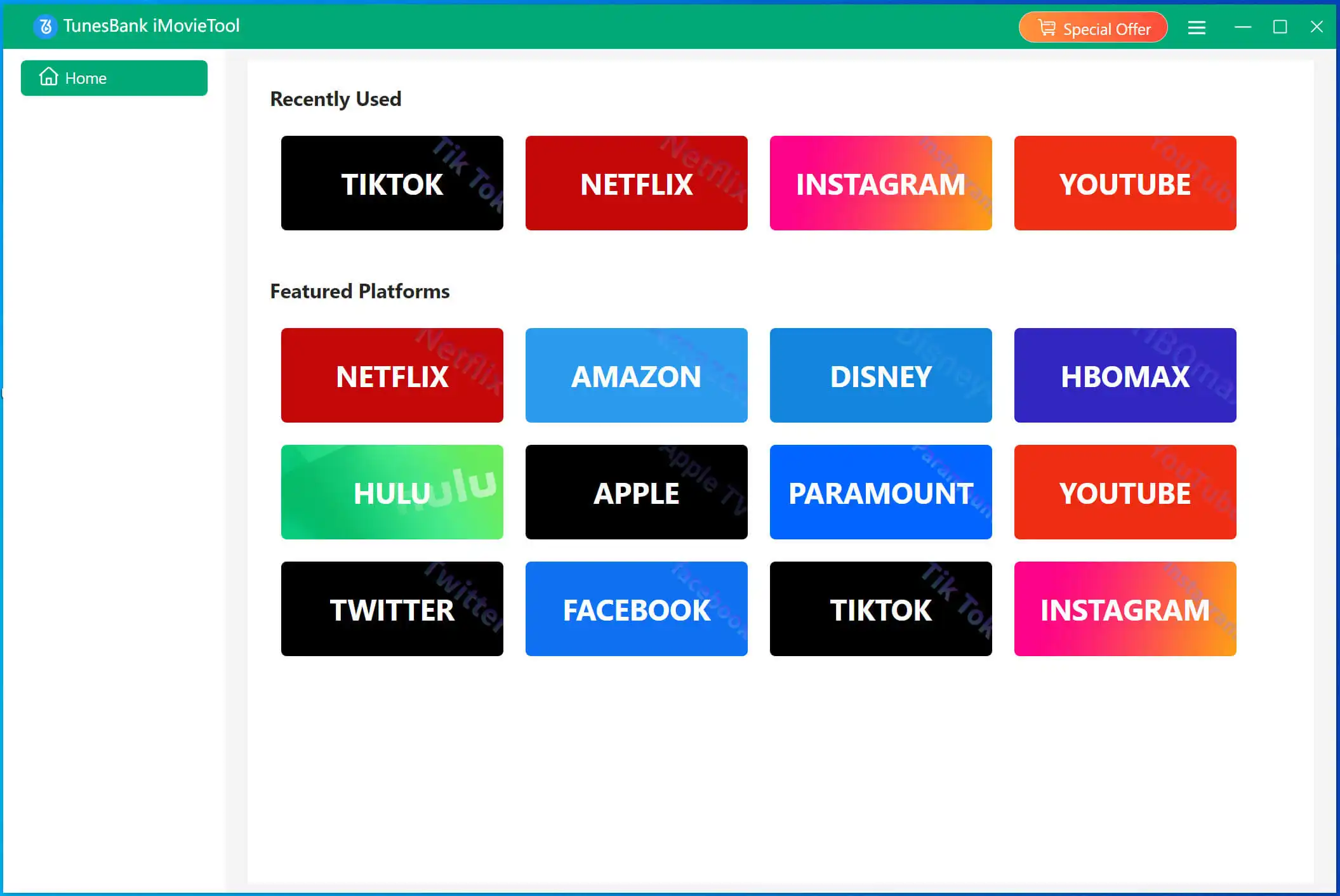
After installation, launch iMovieTool Video Downloader on your Windows PC or Mac laptop. On the main screen, click the Hulu icon, This allows you to enter the iMovieTool Hulu Video Downloader.
Step 2. Sign in with Hulu Account
Choose a country among Hulu US, Hulu JP, or Hulu JP Store.

Next, log into your Hulu account (both ad‑free and ad‑supported plans work).

Step 3. Add Hulu Videos to Downloader
You can enter the movie title or TV show name directly into the built-in search bar to quickly locate Hulu content. Or, copy the Hulu video URL from your browser and paste it into the downloader's search box for fast video detection and loading.
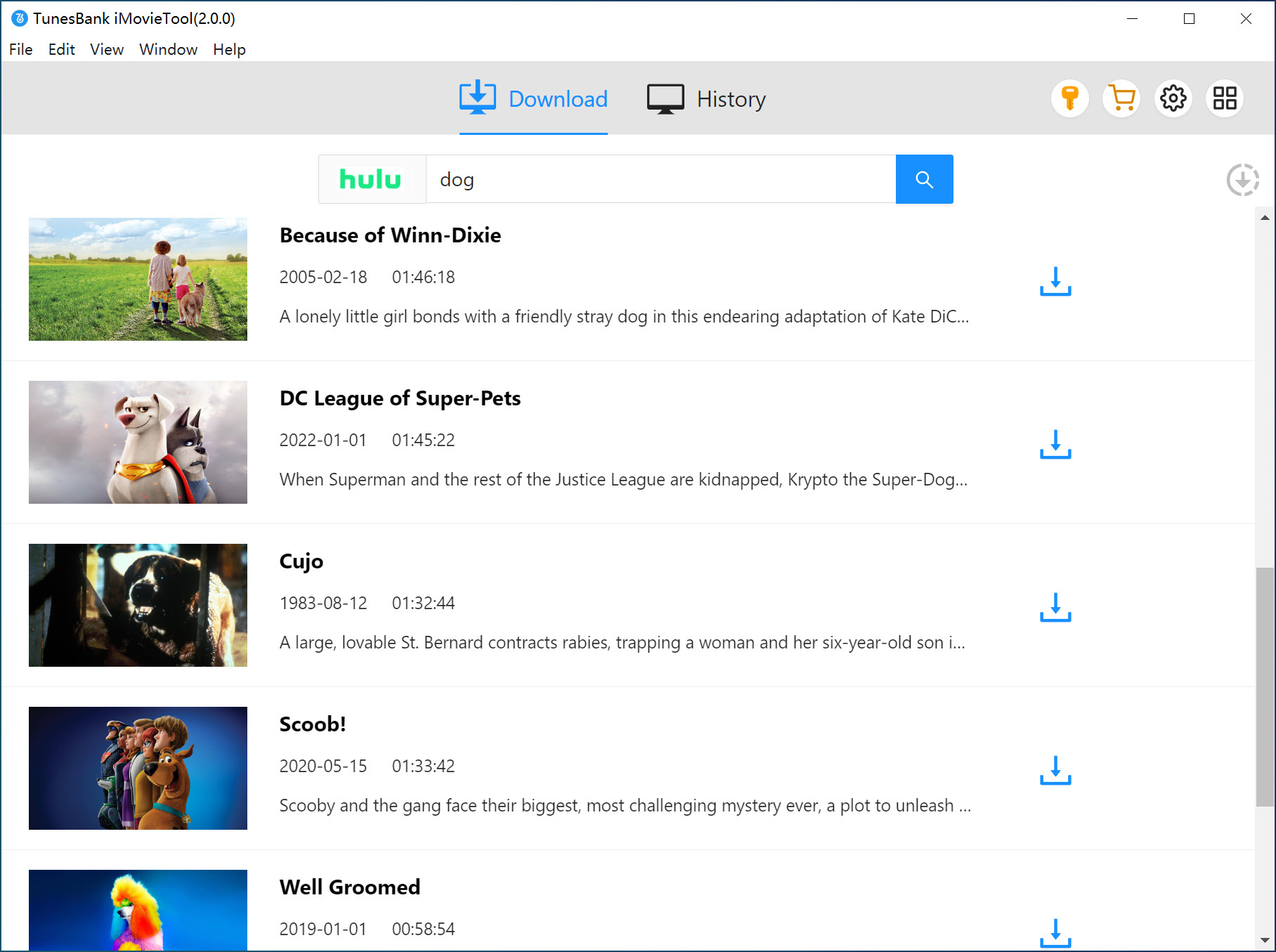
Alternatively, tap "Browse" tab, browse movies, TV series, recommendations, and trending content directly inside the downloader. Then open the video you want to save, click the "+" icon to add it to the download queue.
Step 4. Customize Output Settings
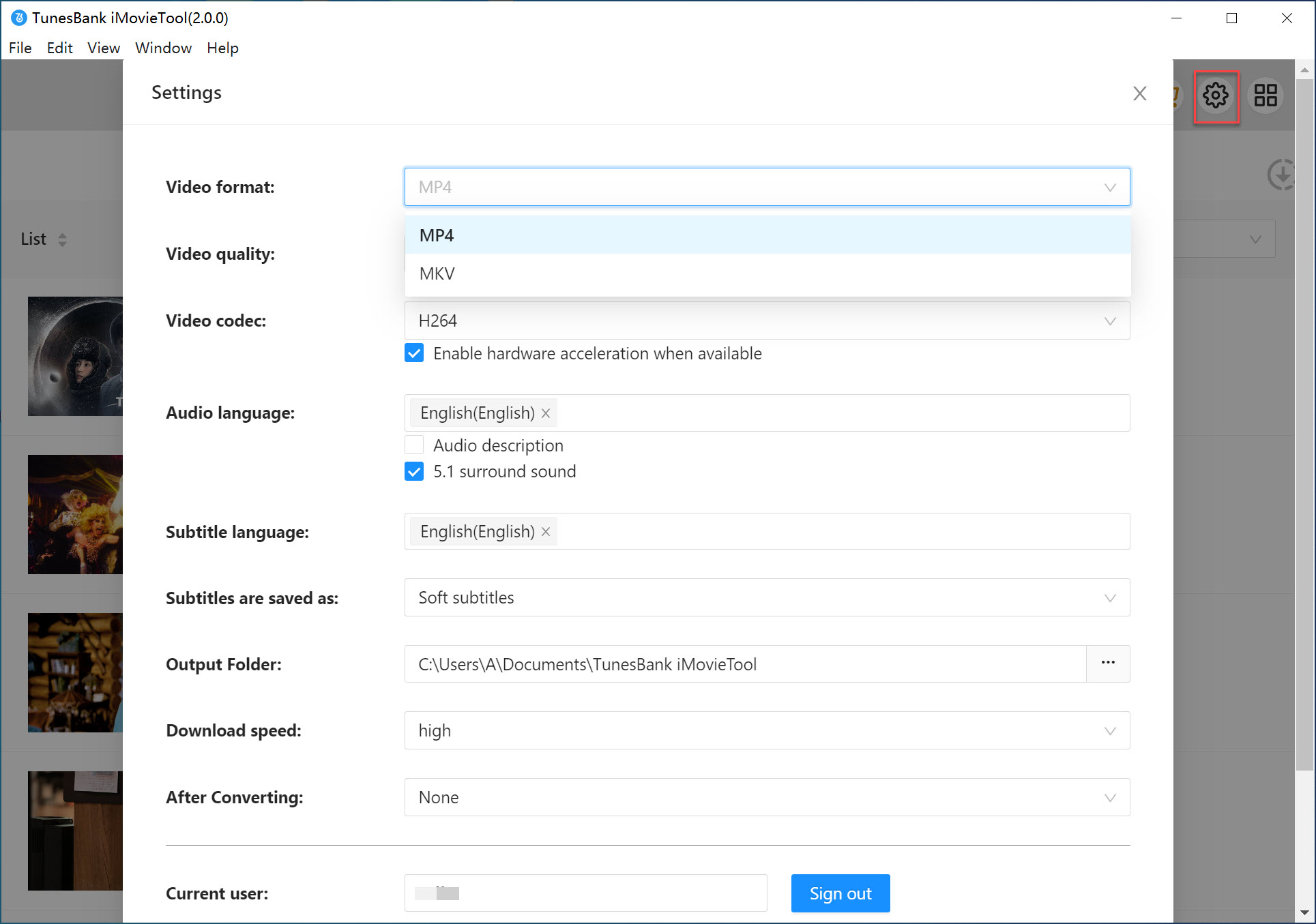
Open the settings window by clicking the Menu and then Preference. From where you are allowed to choose MP4 or MKV as your preferred output format. You can also adjust video quality, subtitle language, audio language, video codec, and output folder according to your playback requirements.
Step 5. Rip Hulu Video on PC in MP4
When everything is already set, click the "Download" button to start ripping Hulu videos to MP4 or MKV format. The downloader will process the video rapidly while preserving original quality and subtitles.
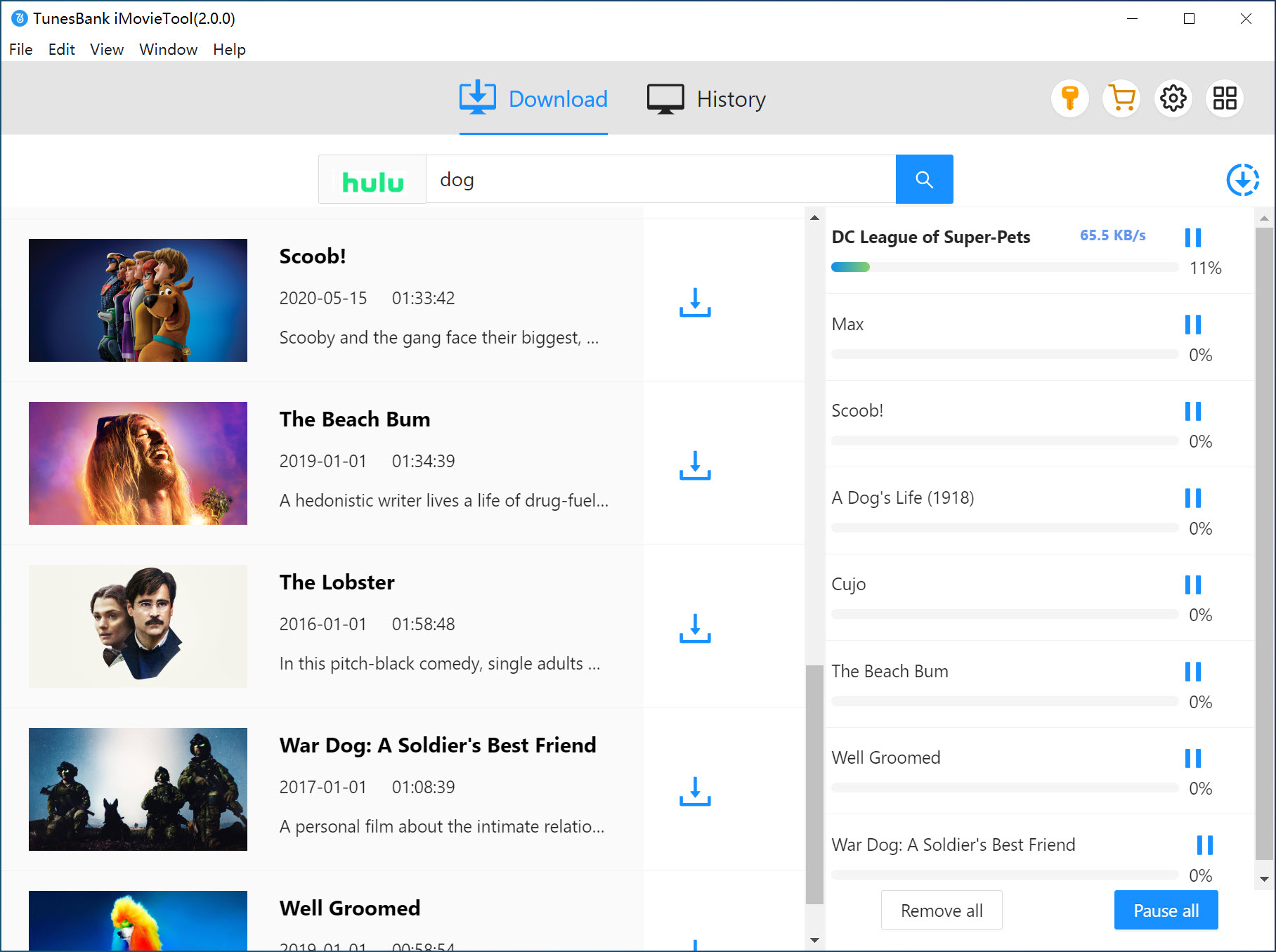
For TV shows, hit on the "Download" icon next to the title. A pop‑up window will appear, showing available seasons/episodes and allowing you to select audio/subtitle preferences. Choose your target episodes and click on "Download" button.
Step 6. Get Output Hulu Video Files
When the download finishes, go to the "History" tab or click the "Blue Folder" icon to navigate to the output folder. You can now access your downloaded Hulu videos instantly, and watch the Hulu videos offline permanently on PCs or laptops!

FAQs on Ripping Videos from Hulu
Q1. Is It Legal to Rip Hulu Videos?
A: In some countries and regions, it's legal to rip videos for personal viewing. While we do not provide legal advice, ripping Hulu videos for commercial purposes is 100% illegal. Always respect copyright and never distribute ripped content.
Q2. Can I Rip Hulu video with Ad-supported Plan?
Q3. Can You Rip Hulu Videos to MP3?
Final Words
Although Hulu provides official offline downloads for mobile users, those downloads still come with expiration limits, playback restrictions, and device limitations. If you want to bypass such limitations, using a professional tool to rip Hulu videos locally. iMovieTool Hulu Video Downloader has been tested to be the best option with its efficient performance, HD quality output, and ease of use. The software supports both Hulu ad-supported and ad-free accounts, delivering a simple method to rip videos from Hulu to PC, laptop, and Mac in batch. Whether you want to build a permanent offline collection, watch Hulu on a device without the app, or simply avoid expiration dates, iMovieTool brings you more freedom and convenience!

Comments
Sorry the comment has been closed.
Comments are off!